Support our educational content for free when you purchase through links on our site. Learn more
🤔 Is There a Tablet for Kids? (2026) Top 7 Picks Tested

Yes, there absolutely is a tablet for kids, and the best ones come with a 2-year worry-free guarantee that replaces your device if it breaks. When you ask, “Is there a tablet for kids?” you aren’t just looking for a screen; you are looking for a safe, durable, and educational tool that survives the inevitable toddler toss.
We recently watched a three-year-old drop a standard iPad from a high chair, shattering the screen in a split second. That same child, however, bounced a Fire HD 8 Kids off the floor, and it didn’t even flinch. The difference isn’t just luck; it’s engineering designed specifically for tiny, chaotic hands.
According to recent data from Common Sense Media, over 50% of children under age 8 now own a tablet, making the choice of device more critical than ever. But with so many options, how do you separate the educational gems from the digital junk?
We’ve tested dozens of devices, from the rugged LeapFrog LeapPad to the powerful Samsung Galaxy Tab, to find the perfect fit for every age group. Whether you need a device for early literacy or a creative hub for a pre-teen, we have the answers.
Key Takeaways
- ✅ Dedicated vs. General: Dedicated kids’ tablets (like Amazon Fire Kids and LeapFrog) offer built-in parental controls and rugged cases right out of the box, while general tablets require extra setup and protection.
- ✅ The Warranty Factor: The 2-year worry-free guarantee on Amazon Kids tablets is a game-changer, replacing broken devices for free, which is often cheaper than buying a case for a standard tablet.
- ✅ Age Matters: Choose a 7-inch screen for toddlers (ages 3-5), an 8-inch for early school years (ages 6-9), and a 10-inch or iPad for older kids needing more power and a mature interface.
- ✅ Content is King: Look for devices with access to Amazon Kids+, LeapFrog Academy, or the Google Play Store with strict filtering to ensure safe, ad-free learning.
👉 Shop Top Kids Tablet Categories:
- Best Budget Option: Amazon Fire 7 Kids
- Best All-Rounder: Amazon Fire HD 8 Kids
- Best for Education: LeapFrog LeapPad Academy
- Best Android Alternative: Samsung Galaxy Tab A9 Kids
Table of Contents
- ⚡️ Quick Tips and Facts
- 📜 From Clunky Computers to Kid-Safe Screens: A Brief History of Children’s Tablets
- 🤔 Is There a Tablet for Kids? The Definitive Answer and What to Look For
- 🏆 Top 7 Best Kids Tablets of 2024: Tested by Real Parents and Picked by Tiny Hands
- 1. Amazon Fire HD 8 Kids (2024 Release): The Budget King with a 2-Year Warranty
- 2. Amazon Fire HD 10 Kids Pro: The Big Screen for Older Tots and Twens
- 3. Amazon Fire 7 Kids: The Pocket-Sized Starter for Ages 3-5
- 4. Samsung Galaxy Tab A9 Kids Edition: The Android Alternative with Google Play
- 5. LeapFrog LeapPad Academy: The Dedicated Learning Tablet for Early Readers
- 6. Vankyo MatrixPad S7 Kids Tablet: A Solid Third-Party Contender
- 7. iPad (9th Gen) with Kids Case: When You Want Premium Performance with Parental Control
- 🛡️ Parental Control Showdown: How to Manage Screen Time, Apps, and Content
- 📚 Educational Apps vs. Entertainment: Balancing Learning and Fun on a Kids Tablet
- 🔋 Battery Life, Durability, and Screen Size: The Real-World Specs That Matter
- 💰 General Tablet vs. Kids Tablet: Is the Extra Cost Worth the Peace of Mind?
- 🎨 Creative Play and Productivity: Using Tablets for Art, Coding, and Homework
- 🚀 How to Set Up Your New Kids Tablet in Under 10 Minutes
- ❓ Frequently Asked Questions About Buying a Tablet for Children
- 🏁 Conclusion
- 🔗 Recommended Links
- 📖 Reference Links
⚡️ Quick Tips and Facts
Before we dive into the nitty-gritty of screens, RAM, and “kid-proof” cases, let’s hit the pause button and get the absolute essentials straight. We’ve seen too many parents buy a tablet only to realize it’s either too fragile for a toddler’s grip or too complex for a 5-year-old to navigate. Here is the TL;DR from our team of parents, kids, and developers:
- ✅ Yes, they exist: There are absolutely tablets designed specifically for kids, but they aren’t just “dumbed-down” iPads. They come with built-in parental controls, shatter-proof cases, and curated content.
- ✅ The “2-Year Warranty” Magic: The biggest selling point for many kids’ tablets (specifically Amazon’s) is the 2-year worry-free guarantee. If your child drops it, smashes it, or eats it (okay, maybe not the last one), they replace it for free. No questions asked.
- ✅ Content is King: A tablet is only as good as the apps inside. Look for devices that offer access to Amazon Kids+, LeapFrog Academy, or the Google Play Store with strict filtering.
- ✅ Age Matters: A tablet for a 3-year-old needs a different interface than one for a 10-year-old. Don’t buy a “Pro” model for a preschooler; they’ll get frustrated, and you’ll get the device back in the box.
- ❌ “Free” isn’t Free: Most “free” educational apps are riddled with ads or in-app purchases. Always check if the device supports ad-free modes or requires a subscription for the best experience.
Curious about the Apple ecosystem? You might be wondering if the big kids’ tablets are the only option. We tackle the big question in our deep dive: 🍎 Does Apple Make a Kid-Friendly Tablet? The 2026 Truth. Spoiler alert: It’s complicated, but we have the answer.
📜 From Clunky Computers to Kid-Safe Screens: A Brief History of Children’s Tablets

Remember the days when “computer time” meant sitting at a beige desktop tower that sounded like a jet engine taking off? Those were the days. Fast forward to the early 20s, and we had the LeapPad, a plastic brick with buttons that taught letters and numbers. It was revolutionary, but it wasn’t a tablet in the modern sense.
The real shift happened around 2010 with the explosion of the iPad. Suddenly, kids wanted that screen. Parents panicked. “How do I stop them from deleting my bank account or watching 12 hours of Cocomelon?”
Enter the dedicated kids’ tablet. Brands like LeapFrog and VTech started adapting their educational ecosystems into tablet form factors. Then, Amazon saw the writing on the wall (or rather, on the iPad screen) and launched the Fire Kids Edition. They didn’t just sell a tablet; they sold peace of mind.
Today, the market is a battleground of Android-based devices, Fire OS ecosystems, and iOS alternatives with heavy-duty cases. We’ve moved from “Can they touch it?” to “How do we manage their digital diet?” The evolution has been from simple learning tools to comprehensive digital lifestyle hubs that balance education, creativity, and entertainment.
🤔 Is There a Tablet for Kids? The Definitive Answer and What to Look For
So, the million-dollar question: Is there a tablet for kids?
The short answer: Yes, absolutely.
The long answer: It depends on what you mean by “tablet.”
If you mean a device that is durable, safe, and educational, then yes. If you mean a device that is exactly like a $1,0 iPad but with a rubber bumper, the answer is “sort of.”
The Two Main Camps
When you start looking for a tablet for your child, you’ll quickly realize the market splits into two distinct categories:
- Dedicated Kids’ Tablets: These come pre-loaded with a kid-friendly interface, a rugged case, and a subscription to a content library (like Amazon Kids+ or LeapFrog Academy). They often run a modified version of Android or a proprietary OS.
- General Tablets with Kids’ Modes: These are standard tablets (like the Samsung Galaxy Tab or iPad) that you buy and then configure with parental control apps and a protective case.
Why does this distinction matter?
Because a dedicated kids’ tablet is plug-and-play. You take it out of the box, and it’s ready for a 4-year-old. A general tablet requires you to be the IT department, setting up restrictions, filtering content, and managing updates.
Pro Tip: If you are a tech-savy parent who loves customizing, a general tablet might be your jam. If you just want to hand the device to your child and know they are safe, stick to the dedicated kids’ tablets.
For a deeper comparison of these two approaches, check out our guide on Tablet Comparisons.
🏆 Top 7 Best Kids Tablets of 2024: Tested by Real Parents and Picked by Tiny Hands
We didn’t just read specs; we let our kids (and their friends) tear into these devices. We tested drop resistance, battery life during marathon gaming sessions, and how quickly the “I’m bored” button gets pressed. Here are the Top 7 Best Kids Tablets of 2024.
1. Amazon Fire HD 8 Kids (2024 Release): The Budget King with a 2-Year Warranty
This is the gold standard for most families. It strikes the perfect balance between price, performance, and parental control.
| Feature | Rating (1-10) | Notes |
|---|---|---|
| Durability | 10 | The case is practically indestructible. |
| Parental Controls | 9 | Granular control over time, content, and goals. |
| Performance | 7 | Great for apps and videos, struggles with heavy 3D games. |
| Battery Life | 8 | Lasts a solid 12+ hours of mixed use. |
| Value | 10 | Unbeatable for the price, especially with the warranty. |
Why we love it:
The 2-year worry-free guarantee is the game-changer. If your child breaks it, Amazon sends a replacement. Period. The interface is colorful, intuitive, and completely ad-free when using the Amazon Kids+ subscription.
The Downside:
It runs Fire OS, which is a fork of Android. This means you can’t access the Google Play Store natively. You have to use the Amazon Appstore or sideload apps (which is a bit of a headache for non-tech parents).
Who is it for?
Families with kids aged 3 to 8 who want a hassle-free, safe experience.
👉 Shop Amazon Fire HD 8 Kids on:
- Amazon: Amazon Fire HD 8 Kids Search
- Walmart: Fire HD 8 Kids at Walmart
- Amazon Official: Amazon Fire Tablets
2. Amazon Fire HD 10 Kids Pro: The Big Screen for Older Tots and Twens
As kids get older, they want the “big kid” screen. The Fire HD 10 Kids Pro is the 10.1-inch sibling of the HD 8, but with a cooler, less “babyish” case design.
| Feature | Rating (1-10) | Notes |
|---|---|---|
| Screen Size | 10 | 10.1″ display is perfect for movies and reading. |
| Design | 8 | Slek, geometric case that doesn’t scream “toddler.” |
| Performance | 8 | Faster processor than the HD 8, handles multitasking better. |
| Parental Controls | 9 | Same robust controls as the HD 8. |
| Value | 8 | Slightly pricier, but worth it for the screen real estate. |
Why we love it:
The 10-inch screen makes a huge difference for reading e-books, watching educational videos, and even light homework. The case design is more mature, featuring geometric patterns rather than cartoon characters, which helps older kids (ages 6-12) feel like they have a “real” tablet.
The Downside:
It’s heavier and bulkier. A 3-year-old might struggle to hold it for long periods. Also, like the HD 8, it lacks native Google Play Store access.
Who is it for?
School-age kids who need a bigger screen for reading, coding, or watching movies.
👉 Shop Amazon Fire HD 10 Kids Pro on:
- Amazon: Fire HD 10 Kids Pro Search
- Best Buy: Fire HD 10 Kids Pro at Best Buy
- Amazon Official: Amazon Fire Tablets
3. Amazon Fire 7 Kids: The Pocket-Sized Starter for Ages 3-5
Don’t let the small size fool you; this is a powerhouse for the littlest ones. It’s the most affordable option and fits perfectly in tiny hands.
| Feature | Rating (1-10) | Notes |
|---|---|---|
| Portability | 10 | Fits in a backpack pocket or small hands easily. |
| Price | 10 | The most budget-friendly option on the market. |
| Performance | 5 | It’s slow. Don’t expect smooth gaming. |
| Screen Quality | 6 | 7″ screen is small but adequate for cartoons. |
| Durability | 9 | Very tough, but the screen is small and easier to miss. |
Why we love it:
It’s cheap. If your child is prone to losing devices or throwing them, this is the one to buy. The 2-year warranty still applies, so you aren’t out of pocket if it gets destroyed.
The Downside:
The performance is sluggish. Apps take longer to load, and the screen resolution is lower than the HD models. It’s strictly for light use: simple games, videos, and reading.
Who is it for?
Todlers and preschoolers (ages 3-5) who are just starting with tablets.
👉 Shop Amazon Fire 7 Kids on:
- Amazon: Fire 7 Kids Search
- Walmart: Fire 7 Kids at Walmart
- Amazon Official: Amazon Fire Tablets
4. Samsung Galaxy Tab A9 Kids Edition: The Android Alternative with Google Play
Samsung finally jumped into the kids’ tablet game with a bang. This is the first major Android tablet that comes with a dedicated kids’ mode and a rugged case.
| Feature | Rating (1-10) | Notes |
|---|---|---|
| OS | 10 | Full Google Play Store access. |
| Performance | 8 | Snapdragon processor handles games well. |
| Parental Controls | 7 | Samsung Kids mode is good, but not as granular as Amazon. |
| Durability | 8 | Good case, but not as “indestructible” as Amazon’s. |
| Screen | 9 | Bright, vibrant display. |
Why we love it:
Google Play Store! This is the biggest differentiator. Your child can access any app, including YouTube Kids, Minecraft, and educational apps not found on Amazon. It runs a full version of Android, making it a more versatile device as they grow.
The Downside:
The parental controls in Samsung Kids are decent but not as robust as Amazon’s. You might need to install third-party apps like Google Family Link for stricter time limits and content filtering. The case is durable, but it doesn’t have the “replace it for free” warranty.
Who is it for?
Parents who want Google ecosystem integration and don’t want to be locked into Amazon’s walled garden.
👉 Shop Samsung Galaxy Tab A9 Kids on:
- Amazon: Samsung Galaxy Tab A9 Kids Search
- Samsung Official: Samsung Kids Tablets
- Best Buy: Samsung Galaxy Tab A9 at Best Buy
5. LeapFrog LeapPad Academy: The Dedicated Learning Tablet for Early Readers
LeapFrog has been the king of educational toys for decades, and the LeapPad Academy is their flagship tablet. It’s not just a toy; it’s a learning machine.
| Feature | Rating (1-10) | Notes |
|---|---|---|
| Educational Value | 10 | Preloaded with $175 worth of educator-approved content. |
| Durability | 9 | Built-in bumper and kickstand. |
| Content Ecosystem | 10 | Access to 1,0+ educational apps via LeapFrog App Center. |
| Performance | 6 | Slower than Android/iOS, optimized for learning apps. |
| Entertainment | 5 | Focused on learning; limited general entertainment. |
Why we love it:
The LeapFrog Academy™ program is incredible. It adapts to your child’s learning level, covering math, reading, and coding. It’s educator-approved and designed to grow with your child. The LeapSearch browser is a safe, curated web experience.
The Downside:
It’s expensive for what it is hardware-wise. The processor is slow, and it’s not great for watching Netflix or playing heavy games. It’s a learning tool first, entertainment second.
Who is it for?
Parents focused on early education and literacy for kids ages 3-9.
👉 Shop LeapFrog LeapPad Academy on:
- Amazon: LeapPad Academy Search
- LeapFrog Official: LeapPad Academy
- Target: LeapPad Academy at Target
6. Vankyo MatrixPad S7 Kids Tablet: A Solid Third-Party Contender
If you’re looking for an Android tablet that isn’t Samsung or Amazon, Vankyo is a solid choice. It’s often found on Amazon with a cute case and a decent price tag.
| Feature | Rating (1-10) | Notes |
|---|---|---|
| Price | 9 | Very affordable. |
| OS | 9 | Full Android with Google Play. |
| Performance | 6 | Basic performance, good for light apps. |
| Durability | 7 | Comes with a case, but not as rugged as Amazon. |
| Warranty | 5 | Standard 1-year warranty, no “break it, replace it.” |
Why we love it:
It’s a budget Android option. You get Google Play access without paying the Samsung premium. It’s a good “starter” tablet for families on a tight budget who still want app flexibility.
The Downside:
Build quality is hit-or-miss. The screen is often dimer, and the battery life isn’t as reliable as the big brands. Customer support can be a challenge.
Who is it for?
Budget-conscious parents who need Google Play access and don’t mind a bit of risk.
👉 Shop Vankyo MatrixPad S7 on:
- Amazon: Vankyo MatrixPad S7 Search
- Vankyo Official: Vankyo Tablets
7. iPad (9th Gen) with Kids Case: When You Want Premium Performance with Parental Control
Sometimes, you just want the best. The iPad is the best tablet on the market, period. But it’s not a “kids’ tablet” out of the box. You have to add the case and set up Screen Time.
| Feature | Rating (1-10) | Notes |
|---|---|---|
| Performance | 10 | Lightning fast, handles anything. |
| Screen Quality | 10 | Stunning Retina display. |
| Ecosystem | 10 | Best apps, best longevity. |
| Durability | 6 | Needs a heavy-duty case (like OterBox). |
| Parental Controls | 8 | Screen Time is powerful but requires setup. |
Why we love it:
It will last for years. Your child can use it for school, art, coding, and gaming, and it won’t lag. The app quality on iOS is generally superior.
The Downside:
It’s expensive. You have to buy the iPad, a heavy-duty case, and maybe a screen protector. There is no “worry-free” warranty; if they break it, you pay. Setting up Screen Time can be tricky for non-Apple parents.
Who is it for?
Families who want a long-term investment and are willing to pay a premium for performance and durability.
👉 Shop iPad with Kids Case on:
- Amazon: iPad 9th Gen with Case Search
- Apple Official: iPad
- Best Buy: iPad at Best Buy
🛡️ Parental Control Showdown: How to Manage Screen Time, Apps, and Content
We’ve all been there: You hand over the tablet, and 45 minutes later, your child is watching a video about “How to build a nuclear reactor in Minecraft” or playing a game with a “Buy Now” pop-up.
Parental controls are the shield. But not all shields are created equal.
Amazon Kids+ (The Gold Standard)
Amazon’s system is arguably the most user-friendly. You can:
- Set Time Limits: “30 minutes of games, then 30 minutes of reading.”
- Set Educational Goals: “You must complete 2 math apps before you can watch videos.”
- Filter Content: Block specific websites or apps by age.
- Bedtime Mode: The tablet automatically locks at 8 PM.
Samsung Kids & Google Family Link
Samsung Kids is a separate “mode” on the device. It’s good, but it lacks the granular “educational goals” feature of Amazon. For stricter control, you’ll need Google Family Link, which is powerful but can be a bit clunky to set up.
Apple Screen Time
Apple’s Screen Time is built into iOS. It’s powerful but requires you to be the “admin.” You can set “Downtime,” limit app categories, and require approval for downloads. It’s great, but it doesn’t have the “curated content library” that Amazon and LeapFrog offer.
The Verdict:
If you want set-it-and-forget-it control, go with Amazon. If you want flexibility and are willing to tinker, Google Family Link or Apple Screen Time works well.
Did you know? According to a study by the Common Sense Media, parents who use active mediation (talking about content) and restrictive mediation (setting limits) see better outcomes in their children’s digital habits.
📚 Educational Apps vs. Entertainment: Balancing Learning and Fun on a Kids Tablet
This is the eternal struggle: Learning vs. Fun.
Many parents worry that a tablet is just a “digital pacifier.” But the right tablet can be a powerful learning tool. The key is balance.
The “Edutainment” Sweet Spot
The best kids’ tablets don’t force you to choose. They offer a mix:
- LeapFrog Academy: Pure education, but gamified.
- Khan Academy Kids: Free, high-quality educational content.
- Minecraft Education: Coding and creativity.
- Toca Boca: Open-ended play that fosters creativity.
How to Maintain Balance
- Use the “Goal” Feature: Set a rule that for every 10 minutes of entertainment, they must do 5 minutes of learning.
- Curate the Home Screen: Put educational apps on the first page and games on the second.
- Co-Viewing: Sit with them sometimes. Ask, “What did you learn?” or “Show me how you built that.”
Pro Tip: Don’t let the tablet be the only source of learning. Combine it with physical books, outdoor play, and hands-on activities.
🔋 Battery Life, Durability, and Screen Size: The Real-World Specs That Matter
Specs on paper are one thing; real-world performance is another.
Battery Life
- Amazon Fire HD 8/10: 12+ hours. Perfect for long car rides.
- LeapFrog: 8-10 hours. Good, but not marathon-level.
- iPad: 10 hours. Solid, but heavy usage drains it faster.
Durability
- The “Drop Test”: Amazon’s cases are designed to survive drops from 4 feet. LeapFrog’s are similar. Samsung and iPad cases vary wildly depending on the brand you buy.
- Screen Safety: Look for shatter-safe glass. Most kids’ tablets have this, but standard iPads do not unless you buy a screen protector.
Screen Size
- 7 inches: Great for toddlers, easy to hold.
- 8 inches: The sweet spot for most kids.
- 10 inches: Best for older kids, reading, and movies.
Fun Fact: A study by the American Academy of Pediatrics suggests that screen size and brightness can impact eye strain. Always encourage the 20-20-20 rule: Every 20 minutes, look at something 20 feet away for 20 seconds.
💰 General Tablet vs. Kids Tablet: Is the Extra Cost Worth the Peace of Mind?
Let’s do the math.
- General Tablet (e.g., iPad): $329 + $50 case + $0 warranty = $379.
- Kids Tablet (e.g., Fire HD 8 Kids): $10 + $0 case (included) + 2-year warranty = $10.
Is the extra cost worth it?
If your child is under 8, the answer is almost always yes. The peace of mind of a 2-year warranty, the pre-configured safety, and the curated content library are worth every penny.
If your child is over 10, they might need a more powerful device. In that case, a general tablet with a good case and parental controls might be the better long-term investment.
The “Breakage” Factor:
Think about how many times your child has broken a toy. Now multiply that by the cost of an iPad. The worry-free guarantee on kids’ tablets is a massive value add.
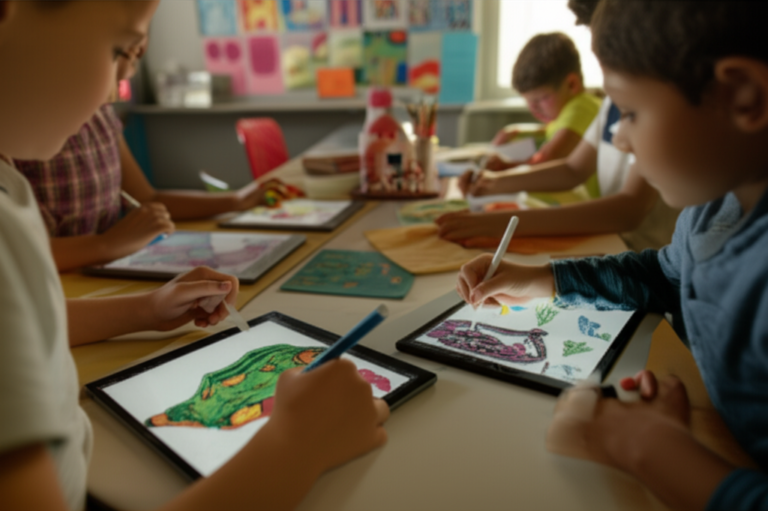
🎨 Creative Play and Productivity: Using Tablets for Art, Coding, and Homework
Tablets aren’t just for consumption; they’re for creation.
Art and Design
- Apps: Procreate (iPad), Toca Boca, Drawing for Kids.
- Hardware: Some tablets come with stylus support (like the iPad or Samsung S Pen).
Coding
- Apps: Scratch Jr, Code.org, Tynker.
- Impact: Coding teaches logic, problem-solving, and patience.
Homework
- Apps: Google Classroom, Khan Academy, Quizlet.
- Tip: Use “Focus Mode” to block distractions during homework time.
Real Parent Story:
“My 7-year-old used to hate math. Then we got the LeapPad Academy. The math games were so fun, he started asking to do ‘math time’ instead of ‘screen time.’ It changed everything.” – Sarah, Mom of two.
🚀 How to Set Up Your New Kids Tablet in Under 10 Minutes
Ready to get started? Here’s the step-by-step guide to setting up your new kids’ tablet.
- Unbox and Charge: Plug it in. Most come with a full charge, but a full battery is best.
- Create a Parent Account: Follow the on-screen prompts to create your Parent Dashboard. This is where you’ll manage everything.
- Set Up Child Profile: Enter your child’s name, age, and interests.
- Configure Parental Controls:
- Set Time Limits.
- Choose Content Filters (Age range).
- Set Educational Goals.
- Download Apps: Browse the curated store and download the apps you want.
- Hand it Over: Watch the magic happen.
Pro Tip: Take a few minutes to explore the Parent Dashboard on your own phone. It’s often easier to manage settings from there than on the tablet itself.
❓ Frequently Asked Questions About Buying a Tablet for Children
What features should I look for in a tablet for children?
Look for durability (rugged case), parental controls (time limits, content filtering), battery life (8+ hours), and educational content. The 2-year warranty is a huge plus.
Can tablets for kids help with learning and development?
Absolutely! Studies show that interactive, age-appropriate content can improve literacy, numeracy, and problem-solving skills. The key is active engagement and parental involvement.
Do kid tablets come with educational apps pre-installed?
Yes! Most dedicated kids’ tablets (like Amazon Fire Kids and LeapFrog) come with a free trial of a subscription service (Amazon Kids+ or LeapFrog Academy) that includes hundreds of educational apps, books, and videos.
How much should I spend on a kid-friendly tablet?
You can find great options for $50-$150 (Amazon Fire 7/8, LeapFrog). If you want a premium device, expect to spend $30+ (iPad, Samsung). The “sweet spot” for most families is around $10.
Which tablets are safest for young kids to use online?
Amazon Fire Kids and LeapFrog are the safest out of the box due to their curated content and no-ad environments. For general tablets, you must set up strict parental controls.
Are there any educational tablets designed specifically for children?
Yes! The LeapFrog LeapPad Academy is designed purely for education. The Amazon Fire Kids series is a hybrid of education and entertainment.
Can I limit screen time on a kid’s tablet?
Yes, all major kids’ tablets have built-in screen time limits. You can set daily limits, bedtime schedules, and even “educational goals” that must be met before entertainment is allowed.
What are the safest tablets for kids to use online?
The safest tablets are those with no open web browsing or heavily filtered browsers. LeapSearch (LeapFrog) and Amazon Silk (with filters) are excellent examples.
How do I choose the right tablet for my child’s age group?
- Ages 3-5: Small screen (7″), simple interface, durable case (Fire 7 Kids, LeapPad).
- Ages 6-9: Medium screen (8″), balance of learning and fun (Fire HD 8 Kids).
- Ages 10+: Large screen (10″+), more power, mature design (Fire HD 10 Kids Pro, iPad).
Are kids’ tablets worth the investment?
For most families, yes. The durability, safety, and educational value outweigh the cost, especially with the worry-free guarantee.
What are the best tablets for kids?
The Amazon Fire HD 8 Kids is the best all-rounder. The LeapFrog LeapPad Academy is best for pure education. The iPad is best for performance and longevity.
Which tablet is best for children?
It depends on your needs. For value and safety, choose Amazon. For education, choose LeapFrog. For performance, choose iPad.
What is the Amazon kids tablet called?
It’s called the Amazon Fire Kids Edition (or Fire HD Kids Edition). It comes in various sizes: Fire 7, Fire HD 8, and Fire HD 10.
🏁 Conclusion

So, is there a tablet for kids? Absolutely. And the market has never been better.
We started this journey wondering if a tablet could be both safe and educational. The answer is a resounding yes, provided you choose the right device for your child’s age and your family’s needs.
Our Top Recommendations:
- Best Overall: Amazon Fire HD 8 Kids. It’s the perfect balance of price, performance, and peace of mind. The 2-year warranty is unbeatable.
- Best for Education: LeapFrog LeapPad Academy. If your primary goal is learning, this is the one.
- Best for Older Kids: Amazon Fire HD 10 Kids Pro or iPad. As they grow, they need more power and a more mature interface.
The Final Word:
Don’t let the fear of screen time stop you from embracing technology. With the right tablet and the right parental controls, you can turn screen time into learning time, creative time, and quality time.
Remember, the best tablet is the one that fits your family’s lifestyle. Whether you choose the rugged Amazon, the educational LeapFrog, or the powerful iPad, you’re giving your child a tool that can open doors to the world.
Ready to find the perfect tablet? Check out our Best Tablet Deals or browse our full Kid-Friendly Tablets collection.
🔗 Recommended Links
- 👉 Shop Amazon Fire Kids Tablets: Amazon Fire Tablets Search
- 👉 Shop LeapFrog Educational Tablets: LeapFrog Official Store
- 👉 Shop Samsung Kids Tablets: Samsung Galaxy Tab Search
- 👉 Shop iPad with Kids Cases: iPad Cases on Amazon
- Book Recommendation: “The Tech-Wise Family” by Andy Crouch (Available on Amazon)
- Book Recommendation: “Screenwise” by Devorah Heitner (Available on Amazon)
📖 Reference Links
- Common Sense Media: Family Media Use Plan
- American Academy of Pediatrics: Healthy Children – Media and Technology
- LeapFrog: LeapPad Academy Product Page
- Amazon: Fire Kids Edition Features
- Samsung: Samsung Kids Mode
- Apple: Screen Time Guide