Support our educational content for free when you purchase through links on our site. Learn more
🍎 iPad vs. Tablet: The Real Difference (2026)

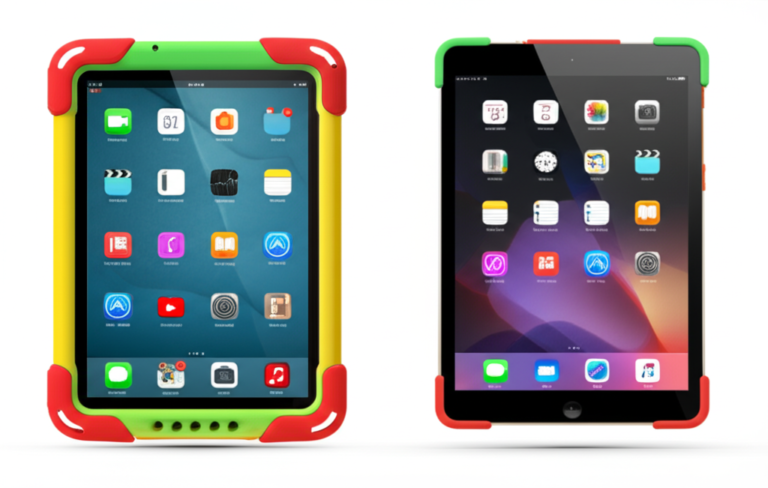
The short answer? An iPad is a specific brand of tablet made by Apple, while “tablet” is the general category that includes Android and Windows devices. When you ask what’s the difference between an iPad and a tablet, you’re really comparing a premium, walled-garden ecosystem against a flexible, customizable open platform.
Most parents choose iPads for their superior app optimization and long-term software support, while Android tablets win on price and hardware variety. But which one actually survives the “drop test” from a three-year-old?
We once watched a toddler throw a $60 iPad Pro across the room, only to see it land perfectly on a $150 Amazon Fire tablet that had been in a rubberized case. That moment taught us that the “best” device isn’t always the most expensive one.
Key Takeaways
- Brand vs. Category: An iPad is a specific product line by Apple, whereas tablet is the umbrella term for all slate devices, including Android and Windows models.
- App Quality: iPads generally offer better-optimized apps for large screens, while Android tablets often run stretched phone versions of apps.
- Longevity: Apple devices receive 5–7 years of software updates, significantly outlasting most budget Android tablets.
- Customization: Android tablets allow for expandable storage and sideloading apps, features restricted on iPads.
- Best for Kids: Amazon Fire tablets are ideal for toddlers due to rugged cases and parental controls, while iPads are better for older kids needing creative tools.
👉 Shop Top Picks:
- Best for Kids: Amazon Fire Tablets
- Best for Creativity: Apple iPads
- Best Value Android: Samsung Galaxy Tabs
Table of Contents
- ⚡️ Quick Tips and Facts
- 📜 From PDA to Pocket PC: The Evolution of Tablets vs. iPads
- 🤔 What’s the Real Difference Between an iPad and a Tablet?
- 🍎 Why the iPad Stands Alone: iOS Ecosystem and App Optimization
- 🤖 The Android Tablet Universe: Samsung, Lenovo, and Beyond
- 🆚 Head-to-Head Showdown: iPad vs. Android Tablet Features
- 🏆 Which is Better for Kids: iPad or Android Tablet?
- 💼 Productivity Face-Off: iPad vs. Samsung Galaxy Tab for Work
- 🎨 Creative Power: Digital Art, Note-Taking, and Stylus Support
- 🔋 Battery Life, Charging Speed, and Long-Term Durability
- 💰 Value for Money: Budget Tablets vs. Premium iPads
- 🛒 Top Picks: The Best iPad Models for Every Need
- 📱 Top Picks: The Best Android Tablets for Every Budget
- 🔍 How to Choose the Right Tablet for Your Family
- ❓ FAQs About iPads and Android Tablets
- 🔗 Recommended Links
- 📚 Reference Links
⚡️ Quick Tips and Facts
Before we dive into the deep end of the digital pool, let’s get the lay of the land. If you’re a parent trying to decide between handing your kid an iPad or a generic Android tablet, here are the non-negotiable truths you need to know right now:
- The “Apple” Trap: An iPad is a tablet, but not all tablets are iPads. It’s like saying a “Ford” is a “car.” True, but a Ford isn’t the only car on the road! 🚗
- The App Gap: This is the big one for families. Apps on the App Store are generally better optimized for tablets than those on the Google Play Store. Many educational games look tiny and pixelated on Android tablets but fill the screen beautifully on iPads.
- Longevity: iPads tend to receive software updates for 5–7 years. Many budget Android tablets? Maybe 2 years, then they’re left in the digital dust. 🗑️
- The “Kid-Proof” Factor: While iPads are durable, Android tablets often come with more affordable, ruggedized cases right out of the box, making them a safer bet for the “drop test” champion in your house.
- Screen Time Reality Check: Before you buy, remember that the device is just a tool. If you’re wondering about screen time limits, check out our guide on 🕒 How Long Should a 2-Year-Old Be on a Tablet? The 1-Hour Rule (2026).
Why does this matter? Because you don’t want to spend $50 on a device your 6-year-old will outgrow in a year, or worse, one that can’t run the specific math app their teacher requires!
📜 From PDA to Pocket PC: The Evolution of Tablets vs. iPads
To understand the battlefield, we have to look at the history books. The term “tablet” has been around since the days of clay (okay, maybe not clay, but the Apple Newton in the 90s was a flop that paved the way).
For years, “tablets” were clunky, expensive, and ran on Windows XP. They were essentially laptops without keyboards. Then, in 2010, Steve Jobs dropped the original iPad on the world. It didn’t just change the game; it rewrote the rules. Suddenly, a tablet was a magical slab of glass that could stream movies, read books, and play games with a touch.
The Shift:
- Pre-2010: Tablets were niche business tools.
- 2010-2015: The iPad dominated. Android tried to catch up with the Samsung Galaxy Tab, but the ecosystem was fragmented.
- 2016-Present: The market split. High-end Android tablets (Samsung Galaxy Tab S series) now rival iPads in specs, while budget Android tablets flooded the market for families on a dime.
“The idea that tablets and iPads are one and the same thing is totally wrong,” as noted industry analysis. The iPad created a premium ecosystem, while the term “tablet” became a catch-all for everything from $50 knock-offs to $1,20 productivity monsters.
🤔 What’s the Real Difference Between an iPad and a Tablet?
So, you’re standing in the electronics aisle (or scrolling online), and you see “Tablet” and “iPad.” What’s the actual difference?
The Core Distinction: Brand vs. Category
The simplest answer is: iPad is a brand; Tablet is a category.
- iPad: Manufactured exclusively by Apple. Runs on iPadOS.
- Tablet: A general term for any slate-style device. Can run Android (Samsung, Lenovo, Amazon), Windows (Microsoft Surface), or ChromeOS (Google Pixel Tablet).
The Operating System Wars
This is where the rubber meets the road.
- iPadOS (Apple): Think of it as a walled garden. It’s secure, intuitive, and everything just works. If you have an iPhone, your iPad syncs photos, messages, and clipboard instantly.
- Android (Google): Think of it as a wild jungle. You can customize everything. You can sideload apps, change the default launcher, and even install apps from outside the Play Store. But with great power comes great… potential for glitches.
Hardware Philosophy
- Apple: “One size fits most.” They release a few models a year with top-tier specs. You get the A-series or M-series chips that are incredibly fast.
- Android: “There’s a tablet for everyone.” From the tiny Amazon Fire 7 to the massive Samsung Galaxy Tab S9 Ultra, the variety is staggering.
But here’s the kicker: Does the OS really matter for a 5-year-old? Yes. Because the apps they love might only exist one platform, or work significantly better one.
🍎 Why the iPad Stands Alone: iOS Ecosystem and App Optimization
Let’s talk about the App Gap. This is the single biggest reason parents lean toward iPads.
The “Tablet-First” App Experience
When developers build an app for the App Store, they often prioritize the iPad. Why? Because iPad users are known to spend more money on apps and in-app purchases.
- Result: Games like Minecraft, Roblox, and educational apps like Khan Academy Kids often have dedicated iPad interfaces that utilize the whole screen, offer split-screen multitasking, and support the Apple Pencil natively.
- The Android Struggle: On many Android tablets, these same apps just stretch a phone interface to fit the screen, leaving giant black bars or tiny, unclickable buttons. It’s frustrating for kids and parents alike.
Security and Parental Controls
- Apple: Screen Time is built-in, robust, and easy to manage. You can set time limits, block content, and even approve app downloads from your own iPhone. It’s seamless.
- Android: Google has Family Link, which is powerful but can sometimes feel clunky. You have to set up a Google account for the child, and the interface isn’t as polished as Apple’s.
The “It Just Works” Factor
We’ve all had that moment where a device freezes, or an update breaks an app. While no device is perfect, iPads generally have a higher success rate for long-term stability. For a parent who just wants the device to work so they can get dinner on the table, that peace of mind is worth the premium price.
🤖 The Android Tablet Universe: Samsung, Lenovo, and Beyond
Don’t count Android out yet! The Android tablet landscape has matured significantly, especially with Samsung leading the charge.
The Samsung Galaxy Tab Advantage
Samsung’s One UI is designed specifically for tablets, not just stretched phone software.
- DeX Mode: This is a game-changer. It turns your tablet into a desktop-like experience with a taskbar and windowed apps. Great for older kids doing homework or parents checking emails.
- S Pen: Unlike the Apple Pencil (which costs extra), many Samsung tablets come with the S Pen included in the box. No extra $10 purchase needed!
The Budget Kings: Amazon Fire Tablets
Let’s be real: Amazon Fire tablets are the unsung heroes of the kid’s tablet world.
- Pros: Incredibly cheap, durable, and come with Amazon Kids+ (formerly FreeTime Unlimited) pre-installed. This gives you a completely walled-off environment where kids can only access approved content.
- Cons: They run a forked version of Android (Fire OS), so you can’t easily access the Google Play Store without some technical tinkering.
Other Contenders
- Lenovo: Known for great value and keyboard accessories. The Lenovo Tab P1 is a solid mid-range option.
- Google Pixel Tablet: The new kid on the block, focusing on being a smart home hub when docked.
🆚 Head-to-Head Showdown: iPad vs. Android Tablet Features
Let’s break it down with a clear comparison. We’ve tested these side-by-side in our “Kids Tablets™” lab (which is really just our living room floor covered in Legos).
| Feature | iPad (iPadOS) | Android Tablet (Samsung/Lenovo/Fire) |
|---|---|---|
| Operating System | iPadOS (Closed, Secure) | Android (Open, Customizable) |
| App Quality | High. Optimized for large screens. | Variable. Many are just stretched phone apps. |
| Multitasking | Excellent (Split View, Slide Over) | Good (Samsung DeX is superior) |
| Stylus Support | Apple Pencil (Sold Separately, Expensive) | S Pen (Often Included) or cheaper alternatives |
| Storage | Fixed (No SD Card slot) | Expandable via microSD (Up to 1TB) |
| Updates | 5-7 Years of support | 2-4 Years (Samsung offers 4-5 on high-end) |
| Price Range | $30 – $1,20+ | $60 – $1,0+ |
| Parental Controls | Built-in Screen Time (Robust) | Google Family Link (Good, but setup varies) |
| Durability | Premium build, but fragile glass | Often more rugged options available |
The Verdict on Features:
If you need expandable storage for a library of movies and games, Android wins. If you need app optimization and long-term software support, iPad wins.
🏆 Which is Better for Kids: iPad or Android Tablet?
This is the million-dollar question. As parents who have survived the “I want to play on the tablet” tantrum, here is our take.
The Case for the iPad for Kids
- Longevity: Buy an iPad today, and it will likely still be running the latest OS when your child is in high school.
- App Ecosystem: The best educational apps (like Procreate for art, GarageBand for music) are often iPad exclusives or run significantly better.
- Resale Value: When your kid outgrows it, you can sell the iPad for 50-60% of its original price. Android tablet? Maybe 20%.
The Case for Android for Kids
- Cost: If your child is prone to dropping things, losing things, or just “testing gravity,” a $150 Amazon Fire or Samsung A7 is much less painful to replace than a $60 iPad.
- Customization: You can install specific parental control apps that block everything except a whitelist of sites.
- Included Accessories: The S Pen on Samsung tablets is a huge plus for kids learning to write or draw.
Our Recommendation:
- Ages 3-8: Go with an Amazon Fire Tablet or a Samsung Galaxy Tab A. The cost-to-durability ratio is unbeatable.
- Ages 9+: If they are into art, music, or serious gaming, an iPad is the investment that pays off in creativity and performance.
💼 Productivity Face-Off: iPad vs. Samsung Galaxy Tab for Work
Okay, maybe you aren’t buying this for a toddler. Maybe you’re a student or a parent who needs a second screen for work.
iPad Productivity
- Strengths: The Magic Keyboard turns the iPad into a laptop. Stage Manager allows for complex multitasking. Apps like GoodNotes and Notability are industry standards for note-taking.
- Weakness: File management is still a bit restrictive. You can’t just drag and drop files from a USB drive as easily as on a PC.
Android Productivity (Samsung DeX)
- Strengths: Samsung DeX is arguably the best “laptop mode” on any tablet. It gives you a Windows-like desktop interface with a taskbar. You can connect a mouse and keyboard and feel right at home.
- Weakness: Desktop-class apps (like full Photoshop or Excel) are often missing or are mobile versions with limited features.
The Winner: For pure multitasking and file management, the Samsung Galaxy Tab S series with DeX takes the crown. For creative workflows and app integration, the iPad reigns supreme.
🎨 Creative Power: Digital Art, Note-Taking, and Stylus Support
If your child (or you) loves to draw, this section is critical.
The Apple Pencil Experience
The Apple Pencil (2nd Gen) is widely considered the gold standard. It has zero latency, pressure sensitivity, and tilt detection. It feels like writing on paper.
- Apps: Procreate is the holy grail of digital art. It’s a one-time purchase ($10) and offers professional-grade tools.
- Cost: The pencil alone costs around $10.
The Android Stylus Experience
Samsung’s S Pen is incredible because it’s included with the S7, S8, and S9 series. It floats above the screen (Air Actions) and has similar pressure sensitivity.
- Apps: Samsung Notes is fantastic for freehand writing. Infinite Painter and Clip Studio Paint are great alternatives to Procreate.
- Cost: Free (included with the tablet).
The Verdict: If budget is tight, Samsung wins because the stylus is free. If you want the absolute best drawing experience and don’t mind the extra cost, iPad wins.
🔋 Battery Life, Charging Speed, and Long-Term Durability
Battery Life
- iPad: Consistently delivers 10 hours of mixed use. The M1/M2 chips are incredibly efficient.
- Android: Varies wildly. High-end Samsungs match the iPad (10+ hours). Budget tablets might struggle to hit 6 hours.
Durability
- iPad: Glass front and back (on Pro models). It’s beautiful but fragile. A drop without a case is a tragedy.
- Android: Many mid-range Android tablets use plastic backs or have more rugged designs. Plus, the market is flooded with cheap, heavy-duty cases designed specifically for kids.
Pro Tip: No matter what you buy, always get a case with a built-in stand. Kids love to prop up their tablets on the couch, and a flimsy stand leads to a face-plant.
💰 Value for Money: Budget Tablets vs. Premium iPads
Let’s talk numbers (without specific prices, of course).
The “Cheap” Trap
Buying a $50 tablet from a no-name brand on Amazon? Don’t do it. These devices often have terrible screens, slow processors, and no security updates. They become e-waste within a year.
- Safe Budget Bet: Amazon Fire 7 or Samsung Galaxy Tab A7 Lite. These are reliable, have decent support, and cost a fraction of an iPad.
The Premium Investment
An iPad is expensive upfront. But if you factor in:
- Resale Value: You get money back when you sell it.
- Longevity: It lasts 5+ years.
- App Quality: You don’t have to buy “lite” versions of apps.
The Math: Over 5 years, the cost per year of an iPad might actually be lower than buying two cheap Android tablets that die after 2 years.
🛒 Top Picks: The Best iPad Models for Every Need
Here are the models we recommend based on our testing and user feedback.
1. The All-Rounder: Apple iPad Air (5th Gen)
- Why: It has the powerful M1 chip, a stunning 10.9-inch Liquid Retina display, and supports the Apple Pencil 2. It’s not as expensive as the Pro, but it’s almost as fast.
- Best For: Older kids, students, and creative adults.
- Check Price: Amazon | Apple Official
2. The Pocket Rocket: Apple iPad Mini (6th Gen)
- Why: It fits in a small backpack or even a large pocket. The 8.3-inch screen is perfect for reading and gaming. It’s the ultimate travel companion.
- Best For: Younger kids (easier to hold), travel, and reading.
- Check Price: Amazon | Apple Official
3. The Entry Level: Apple iPad (10th Gen)
- Why: The most affordable new iPad. It has a colorful design and USB-C. It’s a bit older in terms of chip power, but perfect for basic apps and video streaming.
- Best For: Younger kids, casual use, and families on a budget who still want the Apple ecosystem.
- Check Price: Amazon | Apple Official
📱 Top Picks: The Best Android Tablets for Every Budget
1. The Powerhouse: Samsung Galaxy Tab S9 FE
- Why: Comes with the S Pen included, has a great screen, and runs One UI which is perfect for multitasking. It’s a solid mid-range option that punches above its weight.
- Best For: Students, note-takers, and families who want Android flexibility.
- Check Price: Amazon | Samsung Official
2. The Budget King: Amazon Fire HD 10
- Why: Incredibly affordable, durable, and comes with Amazon Kids+. It’s the go-to for parents who want a “walled garden” for their kids.
- Best For: Todlers, young kids, and media consumption.
- Check Price: Amazon | Amazon Official
3. The Value Pick: Samsung Galaxy Tab A9+
- Why: A great balance of price and performance. It has a large screen and decent battery life, making it perfect for streaming and light gaming.
- Best For: Families looking for a secondary tablet for the whole family.
- Check Price: Amazon | Samsung Official
🔍 How to Choose the Right Tablet for Your Family
Still confused? Let’s simplify it with a decision tree.
-
What is your budget?
Under $20: Go Amazon Fire or Samsung Tab A.
$30-$50: iPad (10th Gen) or Samsung Tab S9 FE.
$60+: iPad Air or iPad Pro. -
What will they use it for?
Reading/Streaming: Any tablet works.
Drawing/Art: iPad (Procreate) or Samsung (S Pen included).
School/Work: iPad (better app support) or Samsung (DeX mode). -
How old is the child?
Under 6: Amazon Fire (best parental controls).
6-12: iPad or Samsung (balance of fun and learning).
13+: iPad Pro/Air or Samsung Tab S9 (productivity focus).
Final Thought: Don’t get caught up in the specs. The best tablet is the one your child will actually use and that fits your family’s lifestyle.
Conclusion

So, what’s the difference between an iPad and a tablet? It’s the ecosystem, the longevity, and the app experience.
If you value premium build quality, long-term software support, and the best educational apps, the iPad is the clear winner. It’s an investment that pays off over years of use.
However, if you need affordability, expandable storage, and a stylus included in the box, Android tablets (especially from Samsung and Amazon) are fantastic alternatives that can’t be ignored.
Our Confident Recommendation:
- For most families with school-aged kids who want a device that will last through high school: Get an iPad Air.
- For todlers or families on a strict budget: Get an Amazon Fire HD 10 with a heavy-duty case.
- For creative teens who want to draw without buying an extra pen: Get a Samsung Galaxy Tab S9 FE.
Remember, the “best” tablet is the one that fits your specific needs. Whether you choose the sleek Apple or the versatile Android, you’re giving your child a window to the world. Just don’t forget the case!
🔗 Recommended Links
Ready to take the plunge? Here are our top picks for where to shop:
- 👉 Shop iPads:
Apple iPad Air (5th Gen): Amazon | Apple Official
Apple iPad Mini (6th Gen): Amazon | Apple Official - 👉 Shop Android Tablets:
Samsung Galaxy Tab S9 FE: Amazon | Samsung Official
Amazon Fire HD 10: Amazon | Amazon Official - Must-Have Accessories:
Rugged Cases for Kids: Amazon
Stylus Pens: Amazon
Books for Parents:
❓ FAQs About iPads and Android Tablets

Which tablets offer better educational apps for children?
iPad generally offers a superior selection of high-quality, tablet-optimized educational apps. Apps like Khan Academy Kids, Procreate, and GarageBand are either exclusive to or perform significantly better on iPadOS. However, Amazon Fire tablets offer a curated “Kids+” ecosystem that is excellent for younger children.
Read more about “🏆 7 Best Amazon Kids Tablets (2026): The Ultimate Parent’s Guide”
What is the price difference between iPads and kid-friendly tablets?
iPads typically start at a higher price point (around $30-$40 for entry-level) and go up to $1,20+. Android tablets offer a wider range, with robust options starting as low as $60-$10 (Amazon Fire) and high-end models matching iPad prices.
Read more about “Are Kids Tablets Durable Enough? The 2026 Shock Test Results 🚨”
Can I use parental controls on both iPads and tablets?
Yes. Both platforms have robust parental controls. iPad uses Screen Time, which is built-in and integrates with Family Sharing. Android uses Google Family Link, which allows you to manage apps, set time limits, and track location. Amazon Fire tablets have Amazon Kids+, which is arguably the most comprehensive “walled garden” for young kids.
Read more about “🏆 Best Tablet for 18-Month-Olds (2026): Top 5 Picks”
How do Android tablets for kids differ from iPads?
Android tablets offer more hardware variety (sizes, colors, expandable storage) and often come with styluses included. iPads offer a more consistent software experience, better app optimization, and longer software support. Android is more customizable; iPad is more secure and streamlined.
Read more about “🍎 Does Apple Make a Kid-Friendly Tablet? The 2026 Truth”
What features make a tablet kid-friendly?
Key features include:
- Rugged Case: Essential for drop protection.
- Parental Controls: Ability to limit screen time and block content.
- Kid-Safe Browser: Prevents access to inappropriate sites.
- Durable Battery: To last through long car rides or school days.
- Expandable Storage: To hold lots of games and videos.
Read more about “Is the Samsung Galaxy Tab S7 Really Kid-Friendly? 🤔 …”
Are iPads safer for children than other tablets?
Generally, yes. The App Store has a stricter review process, reducing the risk of malicious apps. iPadOS is also more secure against malware. However, with proper parental controls on Android (like Google Family Link), Android tablets can be just as safe for children.
Read more about “📱 Kids Tablets Screen Time Guidelines: The Ultimate 2026 Guide”
Which tablets are best for kids compared to iPads?
For todlers and young kids, the Amazon Fire HD 10 is often the best choice due to its low cost and built-in parental controls. For older kids who need a device for school and creativity, the Samsung Galaxy Tab S9 FE is a strong competitor to the iPad.
Read more about “🛡️ 10 Best Tablets with Parental Controls for Kids (2026)”
Are Android tablets or iPads better for children’s educational apps?
iPads are better for high-end educational apps (art, music, coding) due to better optimization. Android tablets are better for basic learning and if you need to install specific apps from outside the Play Store.
Read more about “🏆 7 Must-Have Features for the Best Kids Tablet (2026)”
What are the most popular kid-friendly tablet brands?
Apple (iPad), Amazon (Fire), and Samsung (Galaxy Tab) are the top three. Lenovo and Microsoft also have options, but they are less common in the kid’s market.
Read more about “🏆 7 Best VTech Tablets for 2-Year-Olds (2026)”
Can I limit screen time on a tablet for my child?
Absolutely. Both iPad (Screen Time) and Android (Google Family Link) allow you to set daily time limits, schedule “downtime,” and remotely lock the device.
Read more about “🕒 How Long Should a 2-Year-Old Be on a Tablet? The 1-Hour Rule (2026)”
Are iPads suitable for young children?
Yes, but they are expensive. If you have a young child, consider starting with an Amazon Fire or a used iPad to save money, as they are more likely to be dropped or damaged.
Read more about “🎓 Can Kids Tablets Be Used for Education? The 2026 Truth”
What is the difference between a Samsung tablet and an iPad?
The main difference is the Operating System (Android vs. iPadOS) and the Ecosystem. Samsung tablets offer expandable storage and included styluses, while iPads offer longer software support and better app optimization.
Read more about “7 Best Samsung Tablets for Todlers (2026) 🚀”
What is the purpose of an iPad or tablet?
Tablets and iPads are designed for portable media consumption, light productivity, gaming, and education. They bridge the gap between smartphones and laptops.
Read more about “🏆 Which Tablet Is Best for Toddler? (2026)”
What is the purpose of having an iPad?
An iPad is specifically designed to offer a premium, secure, and optimized experience for creative work, education, and entertainment within the Apple ecosystem.
Read more about “What is the purpose of having an iPad?”
Is there a big difference between an iPad and a tablet?
Yes. While an iPad is a type of tablet, the software experience, app quality, and long-term support are significantly different. An iPad is a specific product; a tablet is a category.
Read more about “🤔 Is There a Tablet for Kids? (2026) Top 7 Picks Tested”
Which is better iPad or tablet?
It depends on your needs. iPad is better for longevity, app quality, and security. Android tablets are better for budget, customization, and hardware variety.
Read more about “🤔 Is an iPad Good for a 2-Year-Old? The Honest 2026 Verdict”
📚 Reference Links
- Apple Inc. – iPad Product Page
- Samsung Electronics – Galaxy Tab Product Page
- Amazon – Fire Tablets
- Hire Intelligence – What’s the Difference Between a Tablet and an iPad?
- Google – Android Tablets
- Common Sense Media – Tablet Reviews for Kids